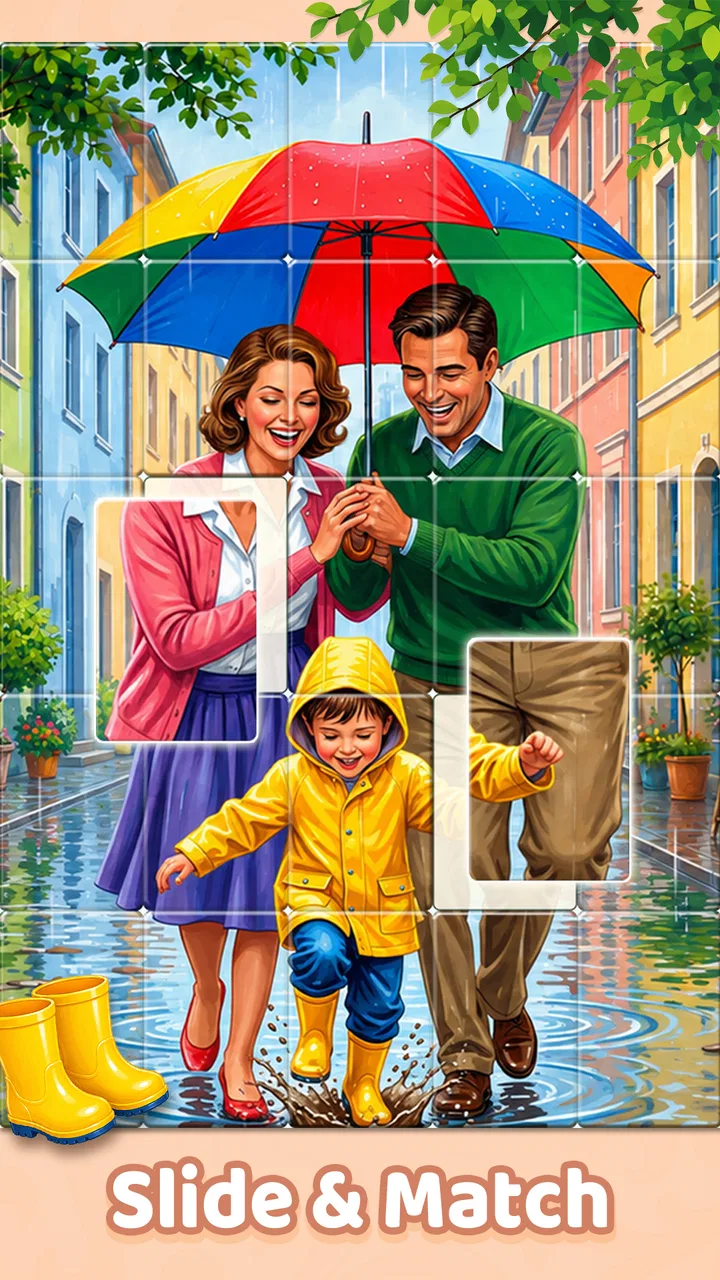
Jigsort®: Solitaire
- 4.9
- Rating
- 1.00M
- Installs
- Free
- Price

 Analysis by App-foxy
I went into Jigsort®: Solitaire expecting a familiar picture puzzle with a small twist, and that is exactly where its appeal begins. Instead of picking up oddly shaped jigsaw pieces and trying to fit them into a fixed board, I slide and sort picture cards until the image comes together. The action is simple enough to understand immediately, but it creates a surprisingly pleasant rhythm: make a move, watch the layout become clearer, finish the picture, then feel tempted to try one more.
That makes this a good fit for short, quiet breaks rather than a game I would open when I want a dramatic challenge. It is a free puzzle game from EasyFun Puzzle Game Studio, aimed at Everyone, and it runs on Android devices using version 6.0 or later. The current release is 1.2.1, while the game’s public launch date is November 28, 2025. Those details matter mainly because the game is accessible to a wide range of phones and tablets, not because it tries to present itself as a technically demanding experience.
What stayed with me after playing was the way the game turns sorting into a form of visual tidying. I was not simply solving a picture; I was repeatedly reducing disorder. That difference gives it a softer personality than many traditional jigsaw puzzle games. If you enjoy calm concentration, clear visual progress, and sessions that can end after a few minutes without feeling incomplete, this one deserves a closer look.
You May Also Like

 Blood Strike: 2.5 Anniversary
Blood Strike’s Loadouts Turn Every Drop Into a Tactical Gamble
A close look at Blood Strike’s custom loadouts: how fast access to signature weapons reshapes its battle royale rhythm, rewards preparation, and narrows the gap between fights.

 Pandora - Music & Podcasts
Pandora’s Music Is Easy to Start, but Harder to Recover
Pandora’s strength is its low-effort path from a seed to a station. Its weak spot is how much confidence it asks you to place in connection, setup, and quiet recovery.

 8 Ball Pool
 Is Built on Rivalries, Rematches, and Routine
A close look at the rivalries, rematches, shared routines, and unanswered safety questions that turn a quick pool match into a persistent mobile community.

 Samsung Music
’s Quiet Strength Is Playing What You Already Own
Its reach comes less from spectacle than from dependable access to a personal library. That simplicity is both the app’s strongest retention engine and its ceiling.

 AccuWeather: Weather Radar
AccuWeather Review: A Quick, Clear Forecast for Everyday Decisions
For everyday plans, the best forecast is the one you can understand quickly. AccuWeather makes rain timing, radar, and local conditions easy to act on, with a few trade-offs.

 Hill Climb Racing
Why Hill Climb Racing Still Turns Crashes Into One More Run
A tiny car, a bumpy hill and one more upgrade: Hill Climb Racing keeps resurfacing because its simple chaos makes every near-miss feel personal.
More From Our News Desk
View All News


How the first move makes the puzzle understandable
The opening interaction is the strongest part of the design. You slide cards and sort them to rebuild a picture, so the basic goal becomes clear through the movement itself. I did not need a long explanation to understand what I was trying to accomplish. The board communicates the problem: the image is broken into pieces, and my job is to bring the visual order back.
That directness is important for a relaxing puzzle. Some games make the first level feel like a tutorial disguised as a challenge, with several rules to remember before anything interesting happens. Here, the central task is immediately readable. I could focus on the image and the arrangement rather than learning a complicated control scheme.
The card-based approach also changes how I think about mistakes. In a conventional jigsaw, I may spend time testing whether a piece belongs in one exact location. In this format, I am thinking more about sequence and position. A move can improve the overall arrangement without completing a connection, which makes the puzzle feel closer to organizing a visual queue than filling a rigid grid.
My practical advice is to avoid rushing into the first available move. I found it more comfortable to scan the whole layout first, looking for cards with obvious colors, edges, or recognizable parts of the picture. Starting with the clearest visual relationship reduces unnecessary shuffling and helps preserve the relaxing mood. The game is easy to begin, but a little observation makes the solving process noticeably smoother.
This is also where the title’s “solitaire” identity makes sense to me. The experience is self-contained and personal. I am not competing against another player, waiting for a turn, or trying to beat a visible opponent. The board is the only thing asking for attention, which makes it suitable for moments when I want an activity without social pressure.
Why the card format feels different from ordinary jigsaws
The biggest difference from a usual jigsaw app is the type of decision being made. Traditional jigsaws reward shape matching and the physical logic of interlocking pieces. Jigsort® focuses more on arranging cards so that the picture progressively makes sense. That makes the game less about hunting for a single perfect fit and more about managing visual information.
For me, this lowered the barrier to entry. I could play without needing the patience required by a large pile of tiny pieces. It also made the game feel more forgiving during a tired moment, when I wanted something to occupy my hands but did not want to study a complicated puzzle for a long time.
There is a trade-off, though. Players who love the tactile satisfaction of traditional jigsaw shapes may find the card movement less rich. The pleasure here comes from order and completion, not from physically locking two unusual edges together. If your favorite part of a puzzle is discovering a precise shape match, a classic jigsaw alternative may offer more depth.
For everyone else, the first action is a strong invitation. The game gives me a clear task, a visible target, and enough movement to make each decision feel active. It avoids the dullness of simply tapping an answer, while keeping the controls approachable.
The feedback rhythm: move, see, understand
The game’s feedback works because every useful action changes the picture in a way I can read. A card shifts, the arrangement becomes more coherent, and I receive a visual clue about what to do next. That creates a steady loop instead of a series of disconnected guesses.
I think of the rhythm in four steps. First, I inspect the current arrangement. Next, I slide a card based on a likely relationship. Then I look at the new picture and decide whether the move improved the structure. Finally, I either continue from that clearer state or adjust my plan. The pleasure comes from this small cycle repeating without demanding too much mental effort.
That feedback is especially useful for people who dislike puzzles that hide progress behind a final result. Even before the image is complete, I can see whether I am moving in the right direction. The board itself becomes a kind of progress indicator. When recognizable sections begin to appear, the next decision feels more obvious, which keeps the session moving.
A helpful technique is to use broad color blocks before fine details. A large area of sky, a strong background tone, or a distinctive object can serve as an anchor. Once those cards are arranged, smaller visual fragments become easier to interpret. This is a more reliable approach than trying to identify every card at once, particularly on a smaller phone screen.
I also found it useful to pause after a few moves instead of treating every empty space as an instruction. A short visual reset can reveal that two cards were being judged by a similar color even though their image details did not align. That pause is one of the game’s quiet strengths: it gives observation a real role, rather than rewarding constant motion.
The feedback rhythm is not always equally satisfying. When several cards look visually similar, a move can feel ambiguous, and the board may require more trial and correction than I expected from such a gentle game. That is not a serious flaw, but it means “relaxing” does not always mean effortless. Some puzzles still ask for careful attention, especially when the image contains repeated textures or colors.
Where the calm design can become less comfortable
My main limitation with the experience is that its simplicity may feel narrow to players who want variety in puzzle mechanics. The core interaction remains centered on sliding and sorting picture cards. That consistency is good for accessibility, but it can also make longer sessions feel repetitive if I am looking for new rule sets, timed pressure, or a more demanding strategic layer.
The game is therefore best judged by the mood it creates, not by the number of systems it contains. I would recommend it to someone who wants a quiet visual task. I would be more cautious recommending it to a player who needs escalating difficulty, competitive rankings, or a strong narrative reason to continue.
Screen size also affects comfort. On a larger display, the picture relationships are easier to inspect and the cards feel less crowded. On a compact phone, I would play with the device close enough to see details clearly, but not so close that the session becomes tiring. Shorter rounds help here, because the game’s structure naturally supports putting it down and returning later.
Another useful habit is to stop treating an uncertain move as a failure. If the layout becomes less clear, I can use that result as information and reassess the surrounding cards. The game’s low-pressure nature makes this possible. I am not losing a life or embarrassing myself; I am simply learning how the current arrangement behaves.
The reward: a picture becoming whole
The reward in Jigsort® is primarily visual completion. A scattered image gradually becomes readable, and the final arrangement provides a clean sense of closure. I found that satisfying because the result is easy to understand: the disorder is gone, and the picture has been rebuilt through my decisions.
That reward is modest, but it is well matched to the game’s tone. It does not need a dramatic story or complicated achievement system to make the final move feel worthwhile. The completed image is the payoff. For a short break, that is often enough.
There is also a quieter reward in the middle of a puzzle. When two or three cards fall into a convincing visual relationship, I get a small confirmation that my reading of the board was correct. Those moments matter because they prevent the experience from feeling like a single long wait for the finish. The game gives me reasons to feel progress before the last card is placed.
This makes it useful in everyday situations. I could imagine opening it while waiting for an appointment, taking a brief break between household tasks, or winding down before sleep when I want something more engaging than passive scrolling. A completed picture gives the session a natural endpoint, so I do not have to stop in the middle of a story or leave a competitive match unfinished.
It also works well as a gentle activity for someone who finds conventional puzzles visually intimidating. The card layout presents a smaller set of relationships at a time, and the objective remains concrete. I would still suggest using a larger device for anyone who struggles to distinguish small image details, but the basic interaction is approachable.
The reward is less compelling for players who need external motivation. If you want points, fast timers, head-to-head pressure, or a constant stream of unlockable systems, this may feel too restrained. Its satisfaction comes from the act of restoring an image, so the player has to enjoy that process rather than expect the game to manufacture excitement around it.
A useful way to play when attention is limited
When I only have a few minutes, I do not try to solve the whole puzzle as quickly as possible. I make a first pass by identifying the most distinctive cards, then arrange the obvious relationships and stop when the board becomes mentally crowded. This turns the game into a small concentration exercise rather than a test of endurance.
That workflow is particularly helpful after a busy day. I can give the puzzle focused attention without committing to a long session. If I return later, the partially organized image provides a more understandable starting point than the original scattered layout. The important benefit is not speed; it is that the game lets me preserve a sense of progress between short visits.
I would not use it as a replacement for a serious brain-training program, because the experience is designed around picture sorting rather than a broad collection of cognitive exercises. I would use it as a low-pressure way to switch attention from work, notifications, or repetitive scrolling to one clear visual task.
The high public response supports that appeal: the game holds a 4.9 average from around 141 thousand ratings and has passed one million installs. I would not treat those figures as proof that every player will enjoy it, but they do show that the straightforward format has found a sizeable audience.
Resetting the session without losing the mood
A good relaxing game needs a natural reset, and this one has one built into its basic structure. Once a picture is rebuilt, the immediate goal is complete. I can stop with a feeling of closure, or begin another puzzle because the action is easy to understand and the next arrangement offers a fresh visual problem.
That reset is more important than it sounds. In many puzzle games, finishing a level leads directly into a more demanding challenge, which can turn a calm activity into a commitment. Here, the completed picture acts as a clean boundary. I decide whether I want another round instead of being pulled along by a long chain of tasks.
The reason to begin again is not usually a new rule. It is the appeal of seeing another image take shape and repeating the same satisfying movement with a different arrangement. This can be a strength or a weakness depending on what I want. The reset feels smooth for casual play, but players who need constant mechanical novelty may find the loop too familiar.
My preferred stopping point is after completing one picture or reaching a moment when the remaining cards require more concentration than I currently have. Because the game’s central task is visual, fatigue can make similar colors and details harder to distinguish. Continuing past that point does not necessarily make the experience more rewarding. A short break often makes the next session feel clearer.
The free price makes experimentation easy. I can try the game without treating it as a major purchase, and its Everyone rating makes the tone suitable for a broad audience. Still, “free” does not automatically make an app right for every person. Someone seeking deep puzzle variety should compare it with a traditional jigsaw title or a logic game before settling in.
For families, I see potential in taking turns discussing which cards look related, although the game itself remains a solitary puzzle rather than a dedicated multiplayer activity. For adults, it is better understood as a personal wind-down tool. The lack of competitive pressure is exactly what makes it comfortable, but also what limits its appeal for group play.
Who should choose it, and who should skip it
I would choose this game if I wanted a calm picture-based puzzle that explains itself quickly, supports short sessions, and gives visible progress after nearly every useful move. It is especially suitable for casual puzzle fans, people who enjoy sorting visual information, and anyone looking for a quiet alternative to endless feeds.
I would skip it if my priority were complex strategy, demanding logic chains, physical jigsaw-piece realism, or competitive replay value. A classic jigsaw app is likely better for someone who enjoys shape fitting and large, detailed scenes. A dedicated logic puzzle may be a stronger choice for someone who wants rules that evolve and require more abstract reasoning.
I would also think twice if small-screen visual work quickly causes eye strain. The concept depends on noticing picture details, so comfortable viewing matters more here than it does in a text-heavy puzzle. A tablet-sized screen could make the experience more pleasant, while a very small phone may make close inspection feel like work.
Finally, players who dislike repeating a familiar action should keep expectations realistic. The game’s strength is refinement of one pleasant loop, not a constant parade of different gameplay ideas. That focus gives it a clear identity, but it means the right audience is someone who enjoys settling into a rhythm.
My verdict on the complete loop
After playing, I see Jigsort®: Solitaire as a polished example of a narrow idea used well. The first action is immediately understandable: slide and sort picture cards. The feedback is readable because each useful move makes the image more coherent. The reward is the quiet satisfaction of seeing the picture restored, and the session resets naturally once that work is done.
The loop succeeds because every stage leads logically to the next. I inspect the disorder, make a move, receive visual information, recognize progress, and decide whether another picture sounds appealing. There is no need for a complicated explanation of why I continue; the changing image supplies the motivation.
Its limitations are equally clear. The card-based format will not replace the tactile logic of traditional jigsaws, and the consistent mechanic may not satisfy players who want escalating systems or competition. Some arrangements can also demand more visual patience than the relaxed presentation initially suggests.
Even with those qualifications, I would recommend it to a friend who wants a free puzzle game for quiet breaks. The developer, EasyFun Puzzle Game Studio, has built the experience around a simple promise and kept the focus on that promise. With an Everyone content rating, support for Android 6.0 and above, and a current version of 1.2.1, it is easy to approach for the intended audience.
The best reason to try it is the clean reset after completion: each finished picture feels like a small task genuinely completed, not merely another screen cleared on the way to something else. If that kind of visual order appeals to you, this game can make a few spare minutes feel pleasantly purposeful. If you need deep strategy or constant novelty, choose a more demanding alternative instead.
FAQs for Jigsort®: Solitaire
01What is Jigsort®: Solitaire, and how does the gameplay work?
Jigsort®: Solitaire combines classic solitaire-style card play with jigsaw puzzle mechanics. Instead of only arranging cards into traditional suits and sequences, you also organize or complete visual puzzle pieces as you progress. The result is a relaxing casual game with simple rules, short levels, and a gradual increase in difficulty. It is designed for players who enjoy both card games and light brain-training challenges.
02Is Jigsort®: Solitaire free to download and play?
Jigsort®: Solitaire can generally be downloaded and played without an upfront purchase, although the free version may include advertisements, optional in-app purchases, or both. Depending on the platform and current developer settings, purchases may offer extra hints, remove ads, or provide additional gameplay benefits. Before downloading, check the app-store listing for the latest pricing, supported devices, and any subscription details.
03Does Jigsort®: Solitaire require an internet connection?
Many casual solitaire games allow at least part of the gameplay to work offline, but certain features in Jigsort®: Solitaire may depend on an internet connection. Advertising, cloud synchronization, special events, updates, leaderboards, and in-app purchases may not function correctly without access to the network. If offline play is important to you, test the game after installation and review its current store description for connectivity requirements.
04Is Jigsort®: Solitaire suitable for beginners and casual players?
Yes, the game is intended to be accessible to casual players, including people who may not regularly play card or puzzle games. Its controls are straightforward, and the early stages typically provide an opportunity to learn the rules without overwhelming the player. However, later levels can require more careful planning and patience. Players looking for a completely traditional solitaire experience should remember that the puzzle element changes the familiar formula.
05Are there advertisements or optional purchases in Jigsort®: Solitaire?
Jigsort®: Solitaire may use advertisements to support its free-to-play model, with ads appearing between levels, after certain actions, or when players choose bonus rewards. Optional purchases may also be available for hints, extra resources, ad removal, or other conveniences. The exact frequency and prices can change with updates, so review the in-app purchase section and privacy information before spending money or allowing purchases on a shared device.
Pros
- Relaxing gameplay suitable for short or extended sessions.
- Simple controls make it easy for new players to pick up.
- Puzzle variety helps keep the solitaire format from feeling repetitive.
- Offline play is convenient when no internet connection is available.
- Helpful visual design makes cards and pieces easy to distinguish.
Cons
- Some puzzles may feel too easy for experienced players.
- Progress can become repetitive after extended play sessions.
- Hints or extra assistance may be limited without spending resources.
- Small-screen devices can make detailed pieces harder to manipulate.
- Ads may interrupt the experience between puzzles.

Jigsort®: Solitaire
Gallery